IPTV USA A Reliable IPTV Subscription for American Homes
An IPTV service in the USA built for the way Americans watch. See your local networks, national news, sports and entertainment over the internet you already pay for, on the Fire TV, Google TV, Apple TV or smart TV already in your living room. Pricing is in US dollars, there is no contract, and you can try the full service free for 24 hours before you pay anything.
- No contract
- No cable box to rent
- TV guide in your time zone
- 30-day money-back guarantee

What Is the Best IPTV in the USA?
The best IPTV in the USA is not the one with the biggest number on its homepage. It's the one that passes four tests in your own home:
- It carries your local channels, or at least the network feeds that match your time zone.
- It holds up at peak hours, such as Sunday afternoon games and weeknight prime time on the East Coast.
- It runs on the device you already own, without sideloading tricks you can't undo.
- It lets you test before you pay, and gives you a written refund policy if things change later.
New IPTV is built around exactly those four points. You can check all of them with a free 24-hour trial before choosing a plan.
What You Can Watch With IPTV USA
Your subscription is organized the way Americans actually watch TV: local first, then the national channels, then everything else you might want.
Local network channels
Affiliates for major US markets, so the evening news and the local weather feel like home. Coverage differs by city, which is why we suggest checking yours during the trial.
National news
The 24-hour news and business channels Americans follow, live, with the TV guide showing what is on now and next.
Sports networks
National and regional sports channels in HD, Full HD and, where the feed allows, 4K. Live games are where a service proves itself, so test one before you buy.
Entertainment and premium
Drama, reality, lifestyle and movie channels, plus an on-demand library of films and series you can start whenever you like.
Kids and family
Children's channels sit in their own group, and adult content stays off unless you ask for it. That's the default for every account.
Spanish-language TV
US Spanish-language networks, and Mexican or Latin American channels if you add those countries to your package.
Channels from back home
Moved to the US from somewhere else? Add the countries you grew up watching to the same login, at no extra cost.
Catch-up TV
Missed a show in the last few days? On supported channels, go back in the guide and play it from the start.
Local Channels and East/West Coast Feeds Explained
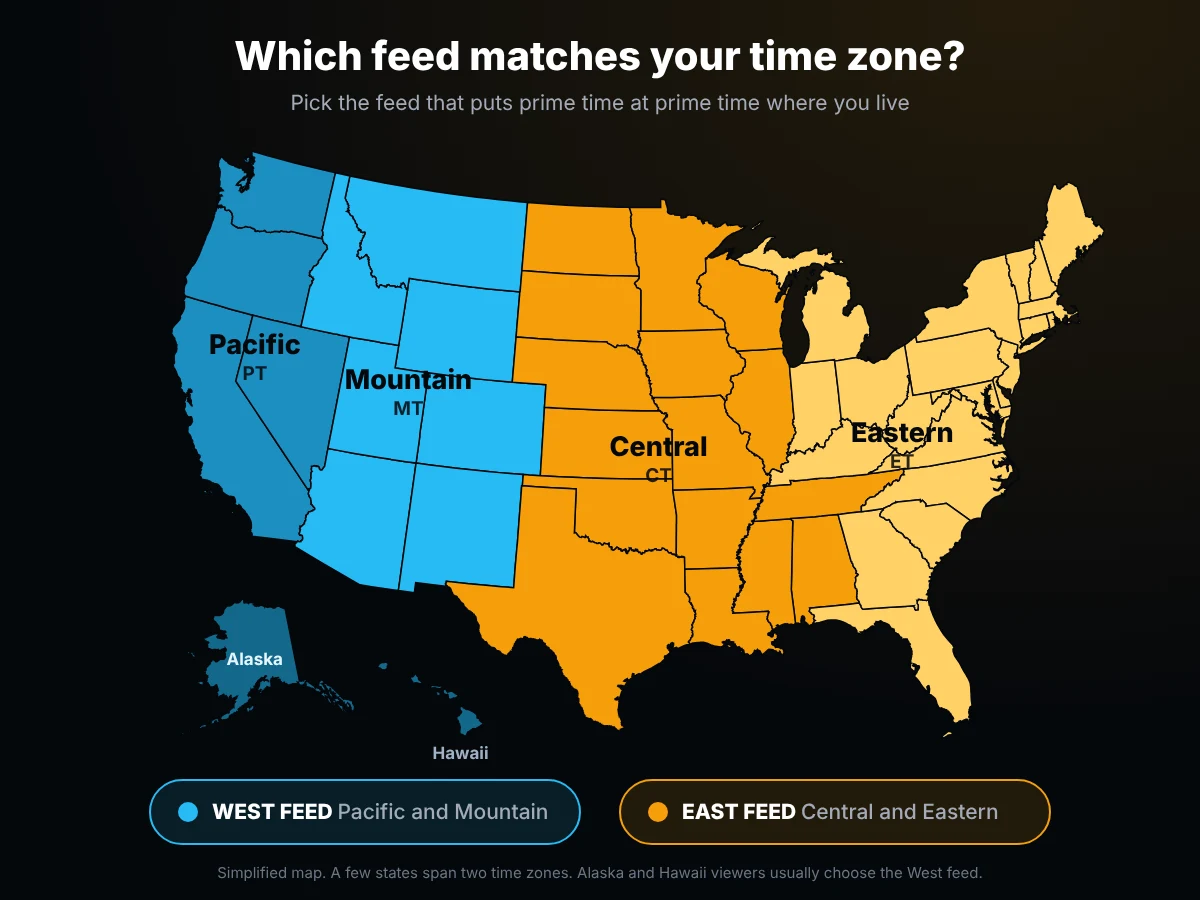
The US spans six time zones, and many national networks broadcast more than one version of their channel to cope with it. That's why prime time starts at 8 p.m. in both New York and Los Angeles, even though the two cities are three hours apart.
Where a network runs separate feeds, you'll see both in your channel list, so you can watch prime time at prime time wherever you live. The TV guide (EPG) follows the time zone set on your device, so program times are always shown in your local time.
Local affiliates are different: each one serves a specific market, from New York and Los Angeles to Chicago, Houston, Atlanta and Phoenix. If your city's stations are important to you, open the local channels group during your trial and check that they're there before you pay.
IPTV USA Subscription Plans and Prices
Simple IPTV packages for US homes: one price per plan, paid once for the whole period. No equipment fees, no regional sports surcharge and no broadcast TV fee added at checkout.
1 Month
- Full US lineup
- Movies and series library
- HD, Full HD and 4K
- TV guide and catch-up
3 Months
- Full US lineup
- Movies and series library
- HD, Full HD and 4K
- TV guide and catch-up
6 Months
- Full US lineup
- Movies and series library
- HD, Full HD and 4K
- TV guide and catch-up
12 Months
- Full US lineup
- Movies and series library
- HD, Full HD and 4K
- TV guide and catch-up
Pay with Visa, Mastercard, Amex, PayPal, Apple Pay, Google Pay or crypto. Card and PayPal payments start at $20, so on those methods the 1-month plan is offered as 2 months for $20. Every plan is covered by our 30-day money-back guarantee.
IPTV vs Cable vs Live TV Streaming in the USA
The median US cable or satellite bill is $125 a month, according to doxo's 2026 report, and live TV streaming services such as YouTube TV, Hulu + Live TV and Sling cost roughly $46 to $96 a month. Here is how an IPTV subscription compares, including what the other two still do better.
Swipe the table to compare →
| Cable or satellite | Live TV streaming apps | New IPTV | |
|---|---|---|---|
| Typical monthly cost | $125 (median bill) | About $46 to $96 | From $14, or $59 for a full year |
| Contract | Often 1 to 2 years | None, billed monthly | None, paid once per plan |
| Extra fees | Box rental, broadcast TV and regional sports fees on many bills | Taxes and, on some plans, sports or 4K add-ons | None added at checkout |
| Channels from other countries | Paid add-on packs | Limited | Add the countries you want to the same login |
| Equipment | A provider box for each TV | Your own streaming device | Your own streaming device or smart TV |
| Recording | DVR box | Cloud DVR included | Catch-up on supported channels |
| Needs home internet | No | Yes | Yes, about 25 Mbps for one 4K screen |
Sources: doxo 2026 U.S. Cable & Satellite Report, via ConsumerAffairs; streaming prices from Tom's Guide (February 2026 base plans, before taxes). Prices change, so check the provider's own site.
Who an IPTV Service in the USA Suits Best
IPTV isn't for everyone. It works best for these households.
Cord-cutters
You've dropped cable or plan to, but still want live channels, not just on-demand apps.
Renters and movers
No installation and no box to return. Move to a new state and you sign in on the new Wi-Fi.
Families with roots abroad
US channels for the kids and channels from home for the parents, on one subscription.
Second homes and RVs
Anywhere in the US with a decent connection, from a lake cabin to a campground with good Wi-Fi.
Not a fit if your home internet is slow or unreliable, or if you need a guaranteed DVR for recording every game. In those cases cable or a live TV streaming service is the safer choice.
Works on the Streaming Devices Americans Already Own
No new hardware to buy in most homes. Pick your device for a step-by-step setup guide.
Amazon Fire TV and Firestick
The most common setup in US homes. Install a player such as TiviMate or IPTV Smarters and you're watching in minutes.
Firestick setup guide →Google TV, Android TV and onn. boxes
Chromecast with Google TV, Walmart's onn. 4K box, NVIDIA Shield and TVs running Google TV all use the same simple setup.
Android TV setup guide →Apple TV, iPhone and iPad
Use an IPTV player from the App Store and sign in with your Xtream login. Your playlist can be the same on every Apple device.
Apple setup guide →Samsung and LG smart TVs
Install a playlist player from your TV's app store. No stick needed, just your remote and a phone or laptop.
Samsung guide · LG guideWindows PC and Mac
Ideal for a home office or a dorm room. A free player like VLC gets you started straight away.
PC and Mac guide →Have a Roku?
Roku's channel store doesn't carry the common IPTV players. Most Roku owners plug in a low-cost Fire TV Stick or Google TV device, which takes a few minutes and costs less than one month of cable.
All setup guides →Good to know: Your New IPTV plan covers the TV service only. Some player apps, such as TiviMate Premium, IBO Player and Hot IPTV, charge a one-time or yearly fee to their own developers, paid directly to them. Free options like IPTV Smarters and VLC work just as well.
Internet Speed You Need for IPTV in the US
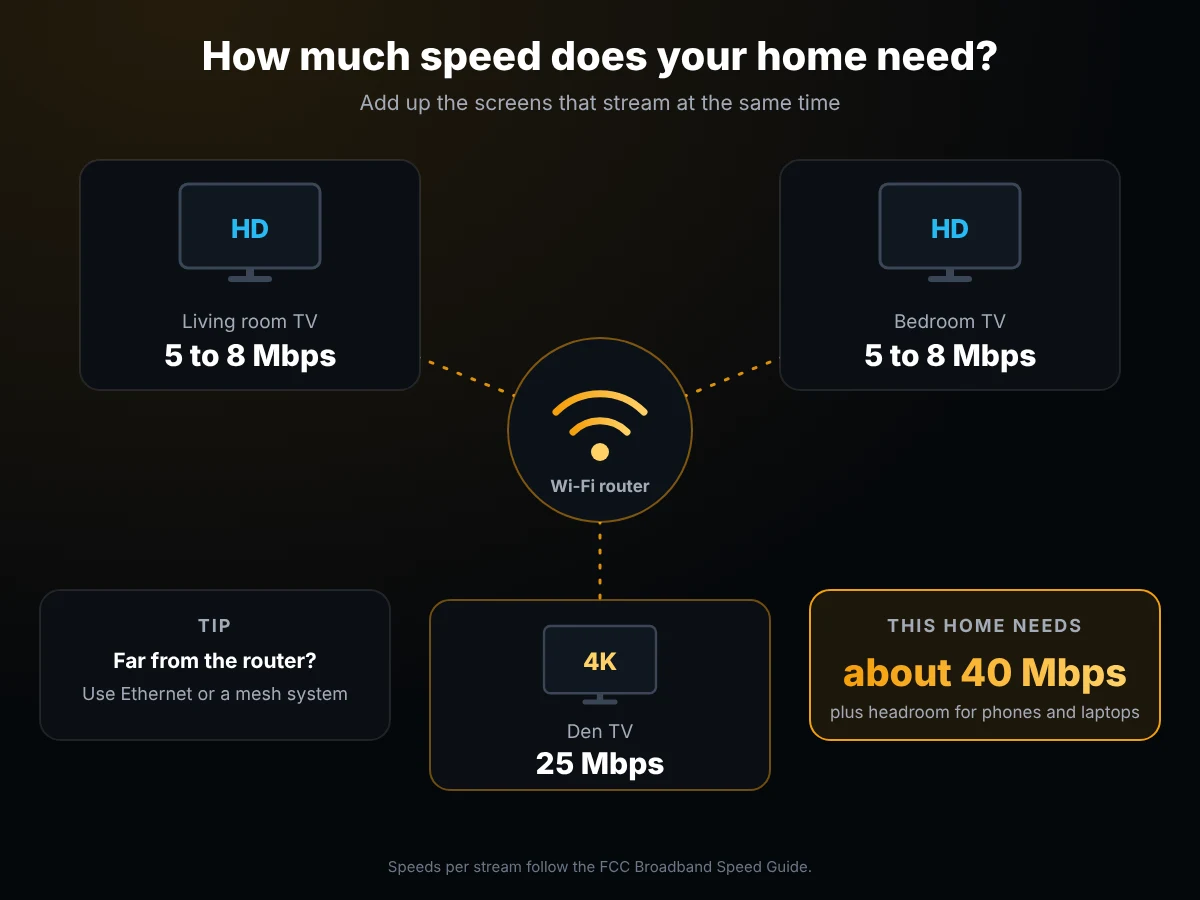
The FCC suggests 5 to 8 Mbps for one HD stream and 25 Mbps for 4K. Most US cable and fiber plans are well above that, so speed is rarely the issue. Wi-Fi usually is.
- Add up the screens that run at the same time. Two HD TVs and one 4K TV need roughly 40 Mbps, plus headroom for phones and laptops.
- Use an Ethernet cable or a mesh system for the TV furthest from your router.
- On a plan with a monthly data cap, remember that 4K streaming can use up to about 7 GB an hour. Xfinity has dropped its old 1.2 TB cap, but some US plans still have one, so check your provider's terms.
Sources: FCC Broadband Speed Guide, Netflix data usage guide.
How to Choose a Reliable IPTV Provider in the USA
There are hundreds of IPTV providers aimed at US viewers, and many look identical. These six points separate a service you'll keep from one you'll regret.
- Prices you can verifyA clear price in US dollars for each plan, with no "from" figures, surprise fees or a different price at checkout.
- No automatic renewalYou should decide when to renew. Be careful with sellers that ask to keep your card on file for a cheap first month.
- Peak-hour stabilityAny service looks fine at 10 a.m. Test during a big game or at 8 p.m. Eastern, when demand is highest.
- Your market, your feedsCheck for your local stations and for the East or West feed that matches your time zone.
- A refund policy in writingA real provider publishes its terms. Read them before you pay, and keep a copy.
- Support that answersSend a question before you buy. How fast and how clearly they reply tells you how they'll treat you after you've paid.
IPTV USA: Frequently Asked Questions
How much does IPTV cost in the USA?
With New IPTV, plans cost $14 for 1 month, $25 for 3 months, $35 for 6 months and $59 for 12 months. That works out to $4.92 a month on the yearly plan, with no equipment or broadcast fees added.
Does IPTV USA include local channels?
Yes, local affiliates are included for major US markets, alongside East and West coast feeds for national networks. Coverage varies by city, so the simplest way to be sure is to look for your stations during the free 24-hour trial.
Is IPTV legal in the USA?
IPTV itself is simply a way of delivering TV over the internet, and US telecom companies use it every day. What matters legally is whether a service has the rights to the content it carries. Before subscribing to any provider, read its terms, and follow the rules that apply where you live. Our own disclaimer and terms are published on this site.
Is cheap IPTV in the USA worth it?
An affordable price is fine. A suspiciously low one usually means overloaded servers that buffer during big games, or a seller who disappears after a few weeks. Look for clear prices, a written refund policy and a free trial you can run at peak hours. If a provider offers none of those, the savings rarely last.
Can I use IPTV on a Roku?
Not easily. Roku's store doesn't offer the common IPTV players, so most Roku owners add an inexpensive Fire TV Stick or Google TV device. Setup takes a few minutes, and your Roku keeps working for everything else.
Do I need a VPN for IPTV in the US?
No, a VPN isn't needed to use our service. Some viewers choose one for privacy, which is fine, but you don't need one to sign in, load the playlist or watch.
Will the TV guide show my local time?
Yes. The guide follows the time zone set on your device or IPTV app, so program times show correctly whether you live in Eastern, Central, Mountain, Pacific, Alaska or Hawaii time.
Does IPTV USA work in every state?
Yes. It runs over your home internet, so it works the same in all 50 states of the United States, on cable, fiber, DSL or fixed-wireless connections with enough speed.
Can I try it before I pay?
Yes. Request a free 24-hour trial and you get the full lineup for the countries you choose. No credit card is required, so there is nothing to cancel afterward.
Try IPTV USA on Your Own TV First
Check your local channels, watch a live game at peak time and see how it runs on your device. If you like it, pick a plan. If you don't, you've spent nothing.
Last updated: November 2026